
Adsparo: Confident Guide to Optimizing Ads and Improving ROI
🎁 Premium tools for just €26.25 with the SPYBOX BLOGSPYBOX20 !
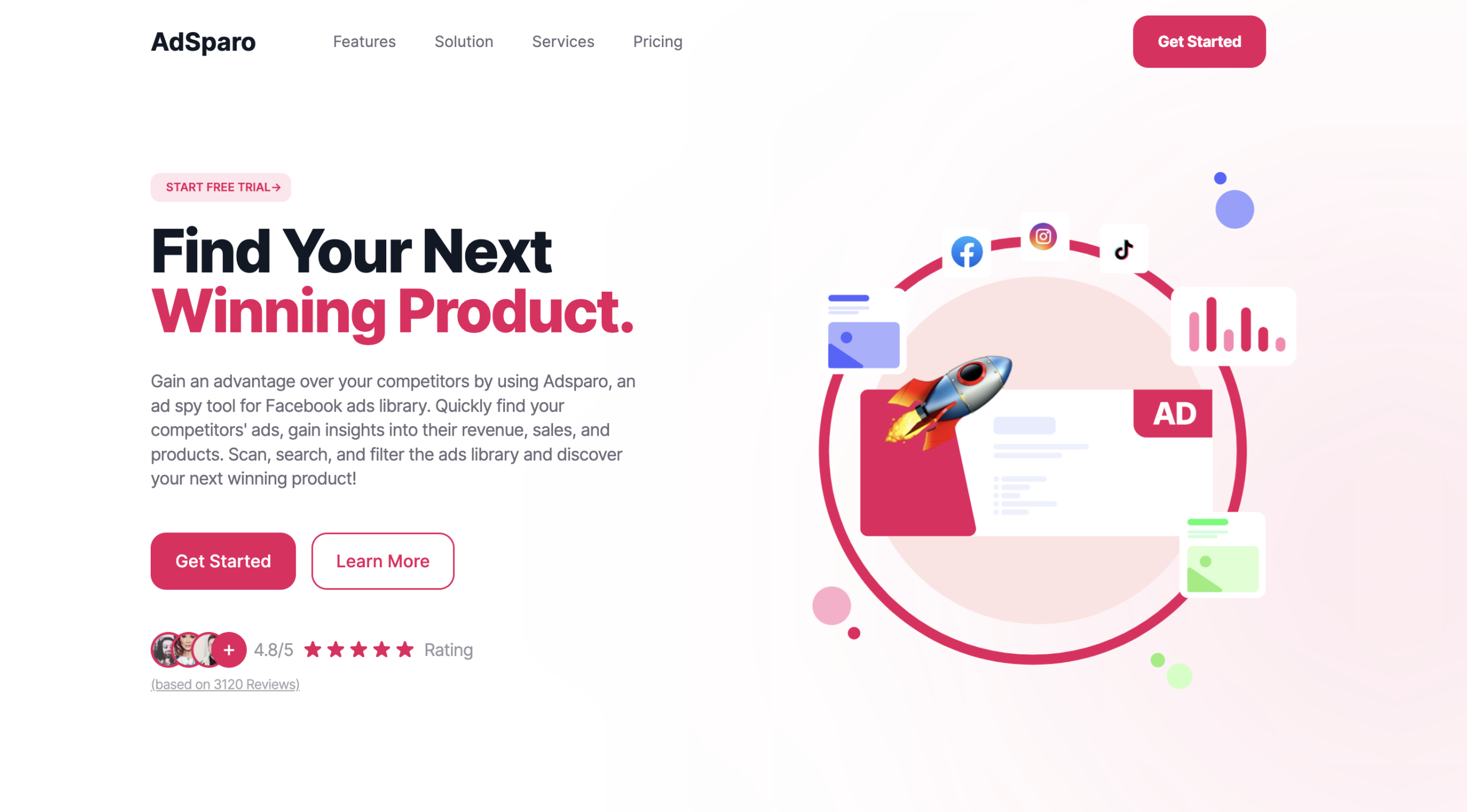
You want a faster way to find ads that actually work, and Adsparo helps you do that by letting you search, filter, and save top Facebook ads quickly. Use Adsparo to spot trending creatives, filter by metrics like date, country, and platform, and save ideas that can boost your own campaigns.
Visit our Spybox blog to see all the tools available on spybox.io
You will see how the tool’s Chrome extension and dashboard cut research time and make competitor and trend analysis simple. The article will walk you through key features, how to use the extension, ways to test and optimize ad strategies, and how Adsparo stacks up against other ad spy tools so you can decide if it fits your workflow.
Key Features and Capabilities
Adsparo gives you tools to find winning products, filter large ad sets, save promising creative, and watch ad performance in near real time. The features below explain how each capability works and how you can use them in product research and ad spying.
AI-Powered Product Research
Adsparo uses AI to scan ad libraries and suggest product and creative ideas based on signals like engagement, ad spend patterns, and creative formats. You can input keywords, competitor pages, or product categories and get ranked suggestions that highlight likely winners.
The AI also generates short ad copy drafts and headline ideas you can test. These drafts match the tone and format of top-performing ads in the Ad Library and aim to shorten your copywriting time.
Results include estimated metrics such as total ads for a product, recent activity, and likely audience intent. This helps you decide which product ideas to test first instead of guessing from raw ad lists.
🎁 Use the SPYBOX coupon BLOGSPYBOX20 to get premium tools for just €26.25!
Advanced Ad Filtering Options
You can filter ads by many precise fields: total ads, category, country, date range, media type (image, video, carousel), language, platform, pixel presence, and domain TLDs. Filters let you narrow thousands of entries to the most relevant set for your market.
Sorting options include Date Created, Last Seen, and Total Ads so you can prioritize fresh campaigns or long-running winners. Combined filters help you isolate, for example, recent video ads from a specific country that use a tracking pixel.
These filters speed up ad research and make comparisons fairer. You can replicate competitor conditions and find trends without wading through irrelevant results.
Ad Collection and Saving
Adsparo lets you collect and save individual ads or whole campaigns for later review. Use the Chrome extension or in-app tools to capture ad copy, creatives, landing page links, and metadata in one place.
You can mark ads as “trending” or tag them by product, niche, or test idea. Saved collections help you build swipe files, set up A/B test lists, or share research with teammates.
Export options let you download creative assets and copy or generate simple reports. This makes sharing with designers or media buyers straightforward and speeds up creative production.
Real-Time Analytics and Performance Tracking
Adsparo provides near real-time analytics on ad performance signals pulled from ad libraries and tracking pixels. You get metrics like last seen date, estimated reach, engagement counts, and trends over time.
Dashboards show which ads gained traction recently and which have cooled off, helping you time tests and scale winners. Alerts can notify you when a tracked ad changes status or when a competitor launches new creatives.
These analytics integrate with your saved ad collections so you can monitor performance for specific products or campaigns. You can make decisions faster and reduce wasted ad spend by following live performance cues.
Using the Chrome Extension
You will install and run the Adsparo Chrome extension to find competitor ads, save ad data, and filter results quickly. The steps below show how to set up the extension, turn on key features like Auto Load and Turbo Ad Finder, and use it alongside Facebook Ad Library.
🎁 Get premium tools for just €26.25 by using the SPYBOX coupon BLOGSPYBOX20!
Installation and Setup
Install the Adsparo extension from the Chrome Web Store by clicking “Add to Chrome” and confirming the permissions. After installation, click the Adsparo icon in Chrome’s toolbar to open the popup. Sign in or create an Adsparo account if prompted to sync saved searches and histories.
Open the extension settings to adjust basic options: enable or disable notifications, set default filter ranges (date and impressions), and choose whether the extension should capture ad creatives automatically.
If you plan to save ads, allow access to local storage so the extension can store ad snapshots. Keep Chrome updated for best compatibility.
Tips:
- Use a stable internet connection when saving large ad libraries.
- Pin the extension to the toolbar for quick access.
- Review permissions after major Chrome updates.
Enabling Auto Load and Turbo Ad Finder
Auto Load automatically fetches more ads as you scroll, so you don’t click “Load more.” Turn it on from the extension popup or settings page. With Auto Load active, Adsparo will collect extra ad entries while you browse a page, saving time during research.
Turbo Ad Finder speeds up detection of active ad links on pages you visit. Enable it in the same settings area and set the scan frequency if available. Use Turbo for fast discovery when you visit competitor sites; it will highlight ad URLs and thumbnails in real time. Monitor CPU usage—Turbo can increase browser load on older machines.
Quick checklist:
- Toggle Auto Load to reduce manual clicks.
- Turn on Turbo Ad Finder for real-time ad discovery.
- Lower scan frequency if your browser slows down.
Seamless Integration with Facebook Ad Library
Adsparo works with Facebook Ad Library (AdLibrary) by extracting ads shown in the library and saving historical snapshots. When you open a Facebook Ad Library page, click the Adsparo icon to apply filters like page name, date range, ad copy, and landing page link.
You can export collected ads or save them to your Adsparo account for later review. Use the extension filters to narrow results to active campaigns or specific ad creatives.
Adsparo does not belong to Facebook; it reads publicly available Ad Library entries to help you organize and analyze them more efficiently.
Practical steps:
- Open Facebook Ad Library and let Adsparo scan the page.
- Apply filters inside the extension to focus results.
- Export or save ads for competitive tracking.
🎁 Use the SPYBOX coupon BLOGSPYBOX20 to get premium tools for just €26.25!
Competitor and Trend Analysis
Use specific ad examples and clear metrics to find rivals, spot what’s trending, and measure your ads against top advertisers. Focus on actual Facebook ads, creative formats, engagement numbers, and ad history to make decisions you can act on.
Finding Competitors’ Ads
Use an ad spy tool to locate competitors by brand, domain, or keyword. Search for the exact competitor name or product keywords to pull their Facebook ads and landing pages. Filter results by country, platform, and active date range so you see current campaigns, not stale ones.
Save copies of ad creatives, headlines, and CTAs in a simple spreadsheet. Track metrics like impressions, engagement, and ad duration when available. This helps you spot repeat creative themes and landing page offers to test in your own campaigns.
Spotting Winning and Trending Ads
Look for ads with high engagement over time and repeated creative runs; these are likely winners. Note creative elements that repeat: short video hooks, benefit-led headlines, demonstration clips, or influencer placements. Pay attention to trending ad formats on Facebook and other channels.
Track top trending ads by sorting your ad spy data by engagement or recency. Mark patterns such as common angles (discount, scarcity, social proof) and creative length. Use this to build a swipe file of top ads to adapt — not copy — for your audience.
Benchmarking Against Top Advertisers
Pick 3–5 top advertisers in your niche and compare them side-by-side. Create a table with columns for creative type, headline style, average engagement, ad run length, and landing page offer. This gives you concrete benchmarks for click-through and conversion targets.
Test your variations against those benchmarks in small A/B tests. Measure metrics the same way: CTR, cost per click, and conversion rate. Use the results to raise your creative and offer standards until your ads match or beat the top ads you tracked.
Optimizing Your Ad Strategies
Focus on using real ad data to pick products, edit creatives, and sharpen campaign settings. Track metrics, save strong ads, and use tools that let you test changes quickly.
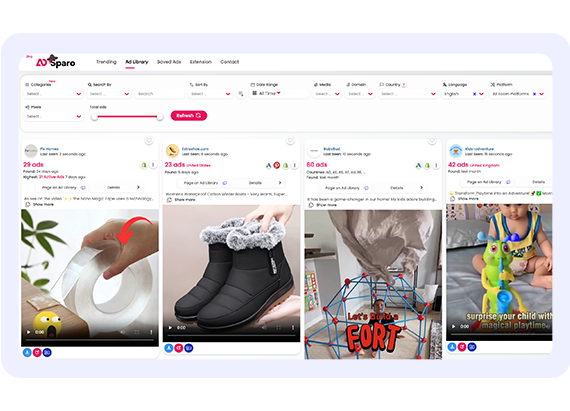
Using Insights for Product Research
Use ad research to spot which products get clicks and shares. Look for ads with long run times and steady engagement; they often point to stable demand. Save ads that show high engagement and repeat patterns in headlines, images, or offers.
Compare top-performing ads by niche, price range, and target audience. Build a short spreadsheet with: product name, ad URL, primary claim, CTA, and observed audience. This turns raw ad intelligence into a quick product research tool you can use to judge market fit.
Check landing pages linked from successful ads. Note price points, discount patterns, and shipping claims. These details tell you what customers expect and help you pick product features to match.
Repurposing and Editing Ad Creatives
Download winning videos and thumbnails to test new edits. Use a photo editor to crop, adjust color, and add clear text overlays that match platform specs. Small changes—different headline, tighter crop, or stronger CTA—often shift performance.
Create 2–4 variants from each strong ad: change headline, swap thumbnail, shorten video, and test vertical vs. square formats. Keep a record of which version you saved and the hypothesis for the change. That makes it easier to measure which creative element drove results.
Reuse assets across platforms but adapt them to each ad format. Use the extension or tool to save competitor ads for inspiration, then edit them to reflect your brand voice and offer.
Improving Campaign Performance
Track ad performance daily for CTR, CPC, conversion rate, and ROAS. Set clear thresholds for pausing underperforming creative and scaling winners. For example: pause ads with CTR under 0.5% after 72 hours or with rising CPCs and falling conversion rates.
Refine audience segments by testing lookalikes, interests, and custom lists. Use short A/B tests for bids, placements, and creatives. Keep tests simple—change one variable at a time—so you know what caused gains or losses.
Log every change and outcome in a campaign audit sheet. Include ad name, creative variant, audience, date, spend, and key metrics. That audit becomes a living guide for future ad strategies and helps you avoid repeating failed tests.
Comparison with Other Ad Spy Tools
Adsparo focuses on fast discovery and AI-driven filtering to surface high-performing Facebook ads and similar creatives. You get more precise search filters, saved collections, and AI summaries that speed up research compared with many basic free tools.
Advantages Over Facebook’s Native Tool
Facebook Ad Library is free and transparent, but it lacks advanced filters and easy saving. With Adsparo you can filter by verified performance signals, ad format, and date ranges in one query. That makes it faster to find recent winning creatives or test variations.
Adsparo also offers bulk saving and tagging. You can export collections and review them later, while Ad Library forces manual bookmarking. Adsparo’s AI highlights landing pages and likely traffic sources, which the native tool does not show.
Search speed matters. Adsparo’s indexing and relevance ranking typically return targeted results faster than scrolling the Ad Library. You still should cross-check ads in the Facebook Ad Library for full legal metadata and disclosure.
🎁 Use the SPYBOX coupon BLOGSPYBOX20 to get premium tools for just €26.25!
Free Versus Paid Options
A true free ad spy tool like Adsparo’s free tier or the Facebook Ad Library gives basic search and browsing. You can use these for quick checks, but expect limits on saved items, export, and advanced filters.
Paid Adsparo plans unlock detailed filters, larger historical ranges, AI summaries, and CSV export. That helps when you run campaigns across platforms and need consistent reports. Paid tools also add multi-platform coverage—some competitors expand to TikTok, YouTube, and native mobile networks.
If budget is tight, use the free ad spy features to validate ideas, then upgrade for scaling research. Compare free limits, export caps, and platform coverage before you commit to a paid plan.
Getting Started and Best Practices
Set up your account, learn the key filters, and use saved and collected ads to build a clear library of competitor and creative examples. Focus on the filters that match your target market, and make a habit of saving ads you want to test or reference later.
Signing Up for Adsparo
Create an account with a valid email and a secure password. Choose a plan that matches the number of searches and saved ads you expect to use. If there’s a free tier or trial, use it to test features like filtering by country, date, and media type before committing.
Verify your email to unlock full access to the dashboard and browser extensions. Connect any supported platforms or pixels if Adsparo asks; this lets you see more context for ads and track which creatives use specific tracking pixels.
Spend 10–15 minutes exploring the interface so you can find Total Ads, Date Created, and Last Seen sorting options quickly.
Filter Configuration Tips
Start by narrowing to the most relevant dimensions: Country, Category, and Date. Set Date ranges to recent 7–30 days when hunting current winners, or expand to 3–6 months for trend research. Use Media Type to separate videos, images, and carousels for creative-specific insights.
Combine filters to reduce noise: pick Category + Platform + Language to target your audience precisely. Use Domain TLDs and Pixels when you want to trace advertiser domains or tracking setups. Sort results by Last Seen to find active campaigns. Save common filter sets so you can re-run searches fast without rebuilding them each time.
Maximizing Results with Saved and Collected Ads
Use the save ads feature to build categorized collections for immediate testing or future reference. Create folders by campaign idea, product type, or creative format to keep collected ads organized. Tag each saved ad with short notes: angle, CTA, length, and why it matters.
Review saved ads weekly to spot recurring elements and copy patterns. Export or share collections with your team when you find a repeat winner. Delete duplicates and archive old ads to keep your library focused on current, actionable examples.